Entity Audit
What this is for, in one sentence: Entity Audit crawls a brand’s own website the way an AI engine does, then reports what stops that engine from resolving one clear company, one clear person, and one clear set of offerings behind it.
When to come here:
- Before trusting any citation or coverage number elsewhere in the product — if AI engines can’t resolve the brand cleanly, everything downstream inherits that confusion
- After a rebrand, a domain move, or a new social profile or spokesperson, to check the site still reads as one entity
- When a fact or a name looks inconsistent across AI answers, to find the structural cause on the site itself
Marcus Tan runs NorthStar Digital as an agency, and this is the one screen in the product built around his own site rather than a client’s. Entity Audit crawls northstardigital.co, resolves what the company, its people and its offerings look like from the outside, and reports where an AI engine would get that resolution wrong.
Business profiles only. Entity Audit is available to profiles set up as a Business — NorthStar Digital is the only demo profile of that size. Profiles set up as Micro SME don’t get the Entity Audit item in the sidebar at all, so its absence there is the profile type, not a fault.
Audits you have run
Section titled “Audits you have run”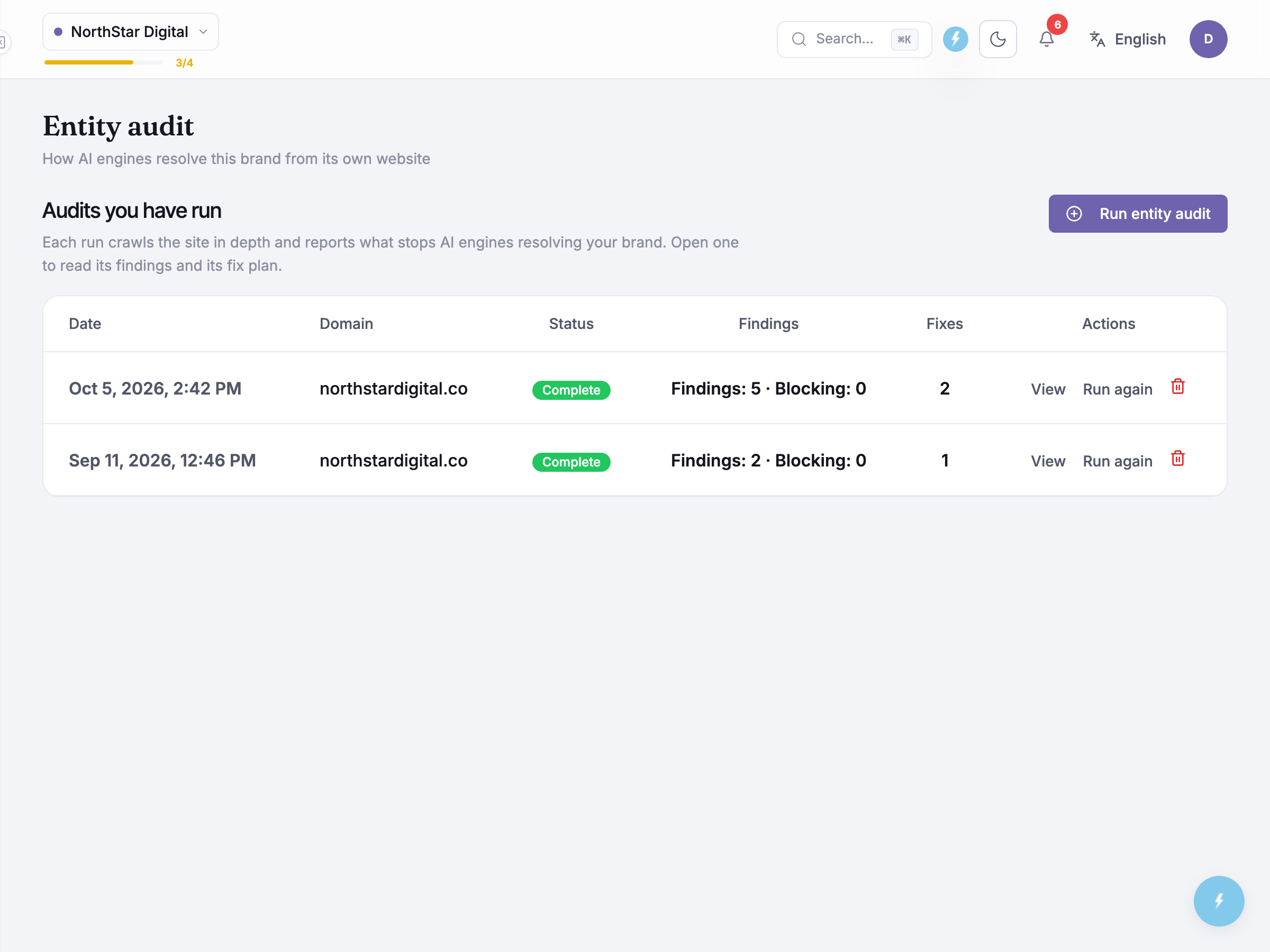 The subtitle states the idea plainly: How AI engines resolve this brand from its own website. Before ChatGPT, Gemini, Perplexity, Google AI Mode or Google AI Overviews cite a business confidently, each first has to work out which pages, name variants and people describe the same real organisation — by reading the site, the way a crawler does. An entity audit is that read, made visible: it crawls a domain, resolves what it finds into a graph of entities, and reports where the resolution breaks down.
Audits you have run lists past runs as a table — Date, Domain, Status, Findings, Fixes, Actions — with a Run entity audit button on the heading row, opposite the title. NorthStar Digital’s history holds one completed run: a Sep 11, 2026 crawl of northstardigital.co, two findings and none of them blocking, one fix generated. A viewer without edit permission sees the same table read-only, with the run and delete controls hidden rather than disabled.
Running an audit
Section titled “Running an audit”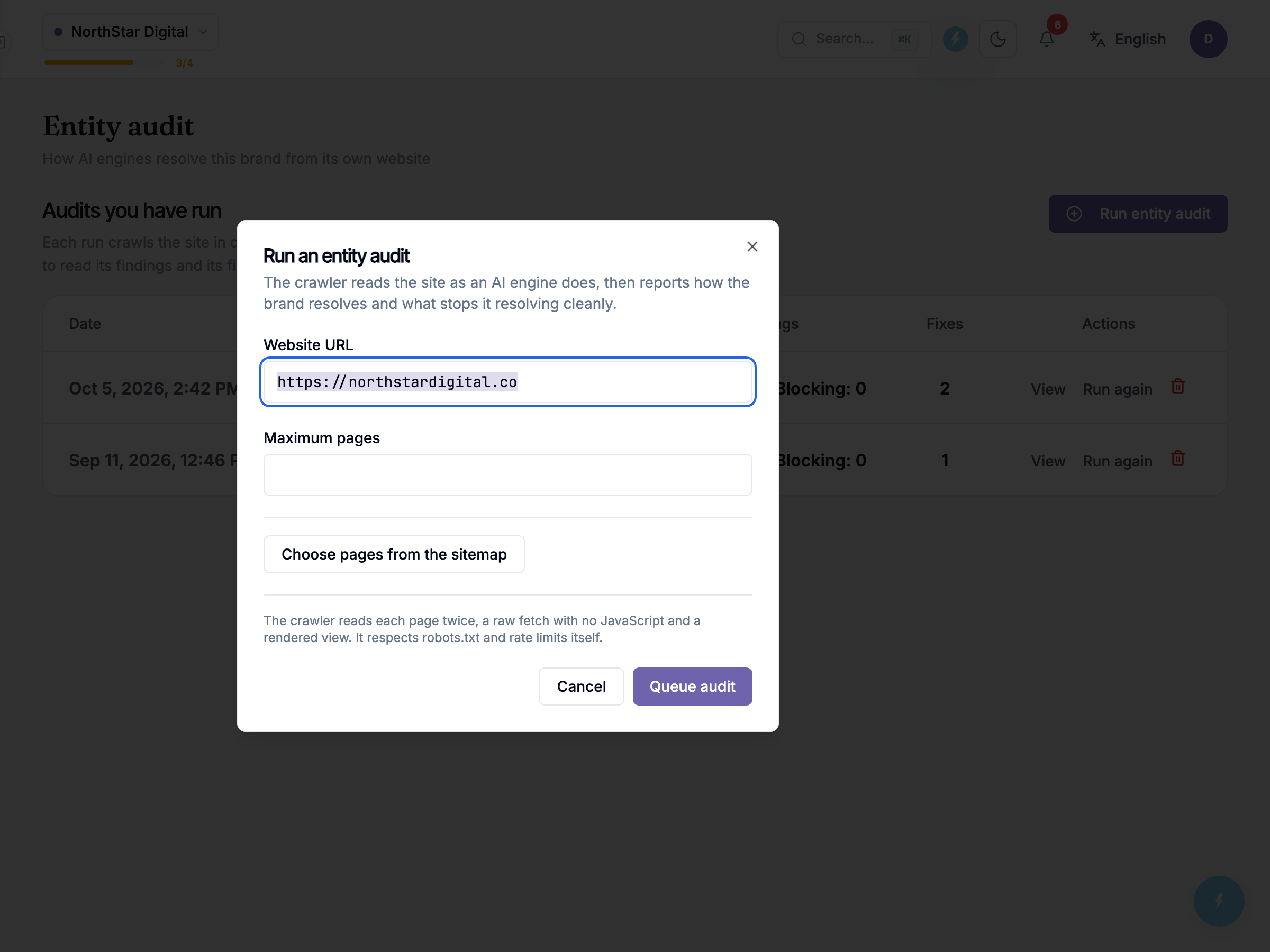 Run entity audit opens a modal. Website URL comes prefilled from the profile. Maximum pages is a whole number from 1 to 1000, and it is left blank by default. A blank field on a run you start by hand reads up to 1000 pages. Anything else shows “Enter a whole number of pages between 1 and 1000.” That is a crawl budget for this one run, not a plan allowance.
Choosing pages is optional. Below the budget sits a Choose pages from the sitemap button; if you leave it alone, the crawler finds pages itself, up to the budget above. Click it and the modal reads the site’s sitemap and lists its pages under Pages to read. Every page starts selected, a counter reads “n of m selected”, and you untick the ones the audit should skip, using Search for pages to exclude to find them. If you select more than the limit allows, the modal tells you how many to untick before you can start. If the site has no sitemap, or it cannot be read, the crawler finds pages itself, up to the budget above.
A footnote adds that the crawler reads each page twice (a raw fetch with no JavaScript, then rendered), respecting robots.txt and pacing itself. Cancel backs out; Queue audit submits.
Once queued, the result page names the stage it’s on — Reading the site, then Reading the markup, Building the entity graph, Checking for problems, Writing the fixes and Preparing the report — and updates on its own as each one finishes; the dashboard polls in the background, even across tabs, so there’s nothing to refresh. Only one audit runs at a time per profile.
While the audit waits its turn, the page shows its place in line (“#n in queue”, “Position in queue”) and when it is expected to start. Once it is running, it shows “Pages read: n of m” and “Expected to finish around” a clock time. If a run goes past its estimate, the page says “Taking longer than usual. Large or slow sites can run past the estimate.”
Honest guidance — durations are estimates. How long a run takes depends on how much the site has to say: a lean brochure site finishes quickly, a large one with a deep sitemap takes longer. Treat the finish time as a guide that can move, not a promise.
Reading the report
Section titled “Reading the report”The report has five tabs: Overview, Report, Internal Links, Entity Registry and Graph View.
The report opens on Overview. It gives a verdict on how AI engines see the brand, then three sections: How AI sees your brand (a map of what the crawl found, where you can click a circle to see what is wrong there), What’s going wrong, and What fixes it, whose steps are “Clear the blockers” and then “Then these unlock”.
The Report tab holds the detail. A Simple / Technical toggle switches how much detail each finding shows, and two filters, How serious and Kind of problem, narrow the list. The work queue offers Copy for my developer. Where a fix is held until the client has answered, Record the client’s answer and Confirm and release the fix let you record the answer and release it.
The Internal Links tab shows the links this audit recommends adding between your own pages, with a map of where they go. The same view has its own sidebar item, covered in Internal Linking.
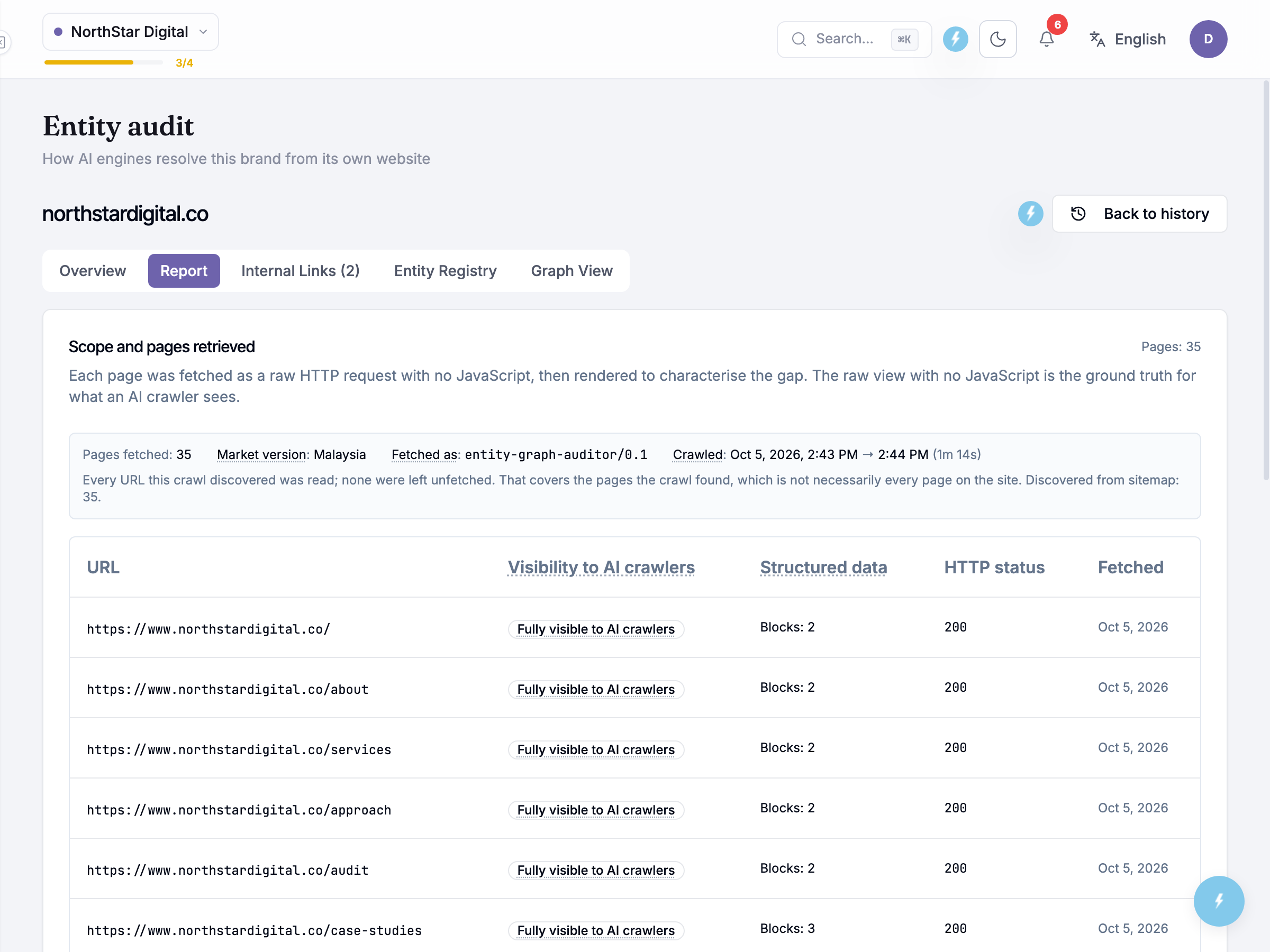 Scope and pages retrieved opens with a bare count (31 pages), then a facts row: Pages fetched: 31, Market version: Malaysia, Fetched as:
 entity-graph-auditor/0.1, and Crawled, a start and end timestamp with the elapsed time beside it. A coverage sentence explains what the count means: “Every URL this crawl discovered was read; none were left unfetched. That covers the pages the crawl found, which is not necessarily every page on the site.”
Honest guidance — a run reads what it discovered, not the whole site. “All 31 pages read” and “every page on the site” are different claims. A page with no inbound link the crawler could follow never enters the count.
The crawled-pages table lists each URL with its Visibility to AI crawlers, Structured data, HTTP status and Fetched date. NorthStar Digital’s pages read “Fully visible to AI crawlers” throughout; the structured-data column counts how many blocks of markup the page carries — two on most pages, three on the case studies page.
Two pill tabs below the table split findings from fixes, with a single Export button on the same row, offering PDF, Word (.docx) and Markdown (.md) for whichever pill is open. Findings sit in one list, sorted by severity (Blocking, then High, then Medium), and the How serious filter narrows it to one level. A blocking finding, when one exists, gates the plan: the fix queue puts its fixes first, under Clear the blockers, and the rest wait under Then these unlock until it clears, since building on an unresolved identity problem wastes the work. NorthStar Digital’s run has no blocking finding this time: just two Medium findings, “The sameAs set has no Wikidata anchor” and “Visible questions with no FAQ schema on the page.” Each card states What goes wrong, its Layer (Company identity or Content and wording here) and Scope (Whole site or One page), a Why AI mis-resolves this explanation, its evidence, and which entities it Affects.
The fix plan turns a finding into publishable markup: a target page, the problem it closes, and a copyable code block. NorthStar Digital’s run generated one fix, and it carries an amber note headed Dependency, not a fix, flagging that it depends on something outside the crawl — creating a Wikidata item — rather than being complete on its own.
Honest guidance — a fix is markup to publish, not a button to press. Copying the block gets the change onto your clipboard; someone still has to paste it in and ship it. Re-run the audit afterwards to confirm it landed.
The entity registry
Section titled “The entity registry”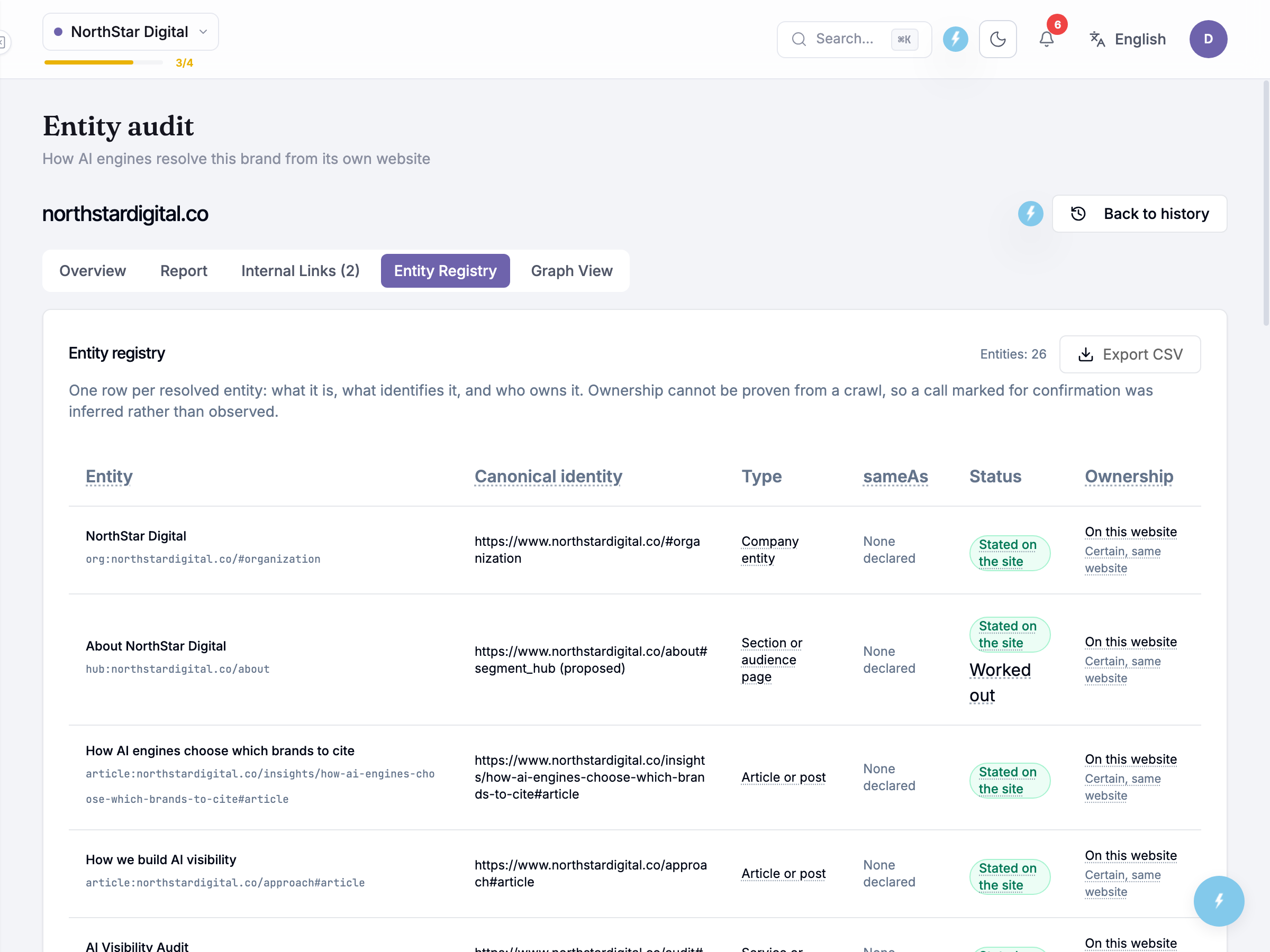 Entity registry lists every resolved entity, one row apiece, in a table of Entity, Canonical identity, Type, sameAs, Status and Ownership, with Export CSV above it. NorthStar Digital’s run resolved 22 entities — the company, Marcus Tan, its services, content sections and social profiles among them — and 14 of the 22 already carry a self-published identity link; the audit proposed one for the rest.
Status marks whether an identity was stated on the site or worked out from context; ownership marks whether the crawl places an entity on this website or elsewhere. Ownership can’t be proven from a crawl the way a status code can — a linked LinkedIn profile is read as belonging to the brand because the brand’s own page says so, not because the crawler checked LinkedIn. The registry says this outright: a call marked for confirmation was inferred, not observed.
The graph view
Section titled “The graph view”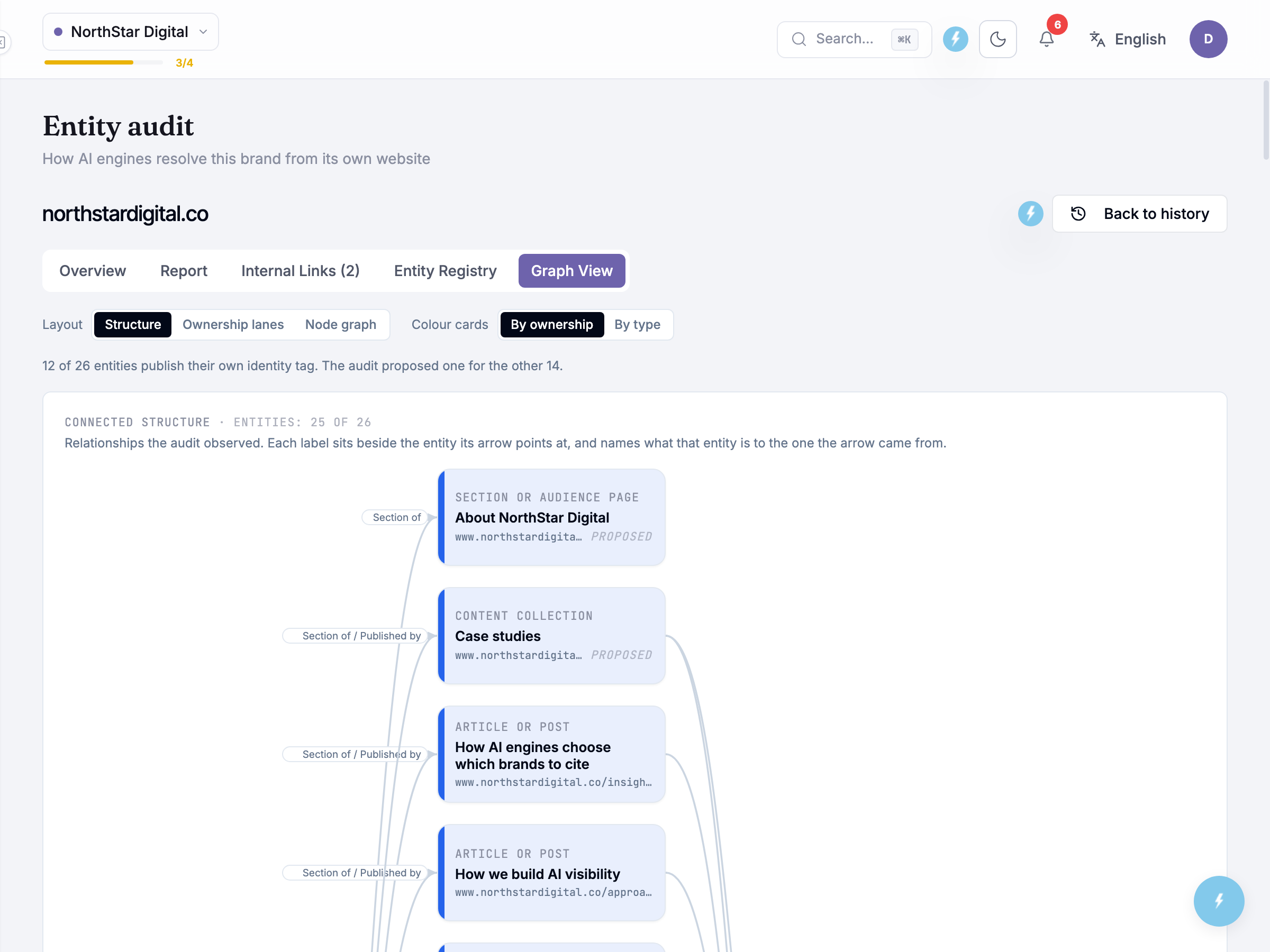 Graph View draws the same 22 entities as a diagram, with two toggles: Layout switches between Structure, Ownership lanes and Node graph; Colour cards switches colouring By ownership or By type. A sentence above the diagram gives the identity-tag picture in full: 14 of 22 entities publish their own identity tag, and the audit proposed one for the other eight.
The connected structure groups entities the crawl found linked to one another — 21 of the 22 here — with edge labels naming the relationship: Section of, Offers service, Declared identity link, Founded by, Works for, Member of and Written by each read from something on the page, not assumed. One entity sits unconnected — nothing the crawl read pointed to or from it, so it’s shown in isolation; a relationship declared on a page outside the crawl’s reach wouldn’t appear here.
Below the diagram, Entity graph lists the same nodes grouped by ownership call, in this order: On this website, Related but independent, Someone else’s site — each with its evidence, and Relationships lists every edge with where it was read from.
Honest guidance — proposed is not published. A card marked Proposed is an identity the audit suggests minting; nothing changes on the live site until someone actually publishes it.
Common questions
Section titled “Common questions”Does running an audit use up a quota? No, a run doesn’t draw down analysis credits, and the modal shows no counter. Only one audit runs at a time per profile. If one is already running, you see “An entity audit is already running for this business profile. Wait for it to finish, then run another.” If a run can’t be started for any other reason, you see “The entity audit could not be started.”
Why is ownership a “call” rather than a fact? A crawl can only see what’s linked from the site, not who controls the other end of that link. Treat an inferred row as worth a human glance before relying on it externally.
Can I see a run’s findings without starting a new one? Yes — the history table keeps every past run, and each report, registry and graph stays exactly as generated. Run again only once the site has actually changed.
What to do next
Section titled “What to do next”- Internal Linking: the links to add between your own pages, read from this audit.
- Site Audit — the sibling check for whether AI crawlers can technically read the site, underneath entity resolution.
- Visibility Gaps — where site-wide fixes like this audit’s markup sit alongside content work.
- Brand Intelligence — confirms whether AI engines already cite the brand with the facts this audit is trying to get right.
- Schema Generator — for publishing structured data once a fix names what’s missing.