Brand Intelligence
What this is for, in one sentence: Brand Intelligence audits what AI platforms actually claim about your brand — every claim extracted, fact-checked against sources, and turned into a prioritized fix plan — so the story AI tells your buyers is one you’ve verified.
Brand Intelligence runs on four AI platforms: ChatGPT, Gemini, Google AI Mode and Google AI Overviews. It does not include Perplexity, which is covered by prompt tracking instead.
When to come here:
- Early in your setup, before you invest in new content — fix what AI already believes first
- After any major change to pricing, positioning, integrations, or company facts
- On a regular cadence, because AI answers drift as models and sources update
Priya Nair’s job is MenuPilot’s story, and the most influential re-teller of that story answers thousands of buyer questions a day without ever calling her for comment. This is the screen where she reads what it’s been saying — and finds out that some of it is confidently, sourced-ly wrong.
Running an analysis
Section titled “Running an analysis”On a profile that has never been analysed, the module opens on a short Set up → Run → Review prompt and a single Run your first analysis button; once a profile has one completed run, that state is gone for good and opening Brand Intelligence takes you straight to the newest report.
Every later run starts from Rerun Analysis in the header, with Analysis History next to it for the earlier ones. Rerun Analysis first asks “Which country is this report for?” and offers “Same country — {{location}}” (for example, “Same country — Malaysia”), with the country of the report you are viewing, or Different country; everything else is copied from that report. If that report has no country, the same-country option is greyed out with the note “The last report has no country”, and Different country is selected for you. Analysis History also has a New Analysis button, which asks the same question and copies from your latest report.
A run usually takes about 2–3 minutes and uses one run from your Brand Intelligence runs quota. That quota is separate from the Analysis Quota that your tracked prompts use, and the history shows how many Brand Intelligence runs are left this period. It works from your completed AI responses, so the richer your tracked prompt set, the more the audit has to read.
When your runs are used up and you can buy a runs pack, the banner and the run dialog offer Buy more runs; otherwise they offer to upgrade your plan. A runs pack never expires and is used only after your monthly runs are used up.
The Export menu in the report header offers PDF, Markdown (.md) and PDF + Markdown. The exports cover the Brand Analysis summary, the Brand Narrative and the Brand Facts. They leave out the gaps, the action plan and the full AI answers, so they are safe to share as a diagnosis.
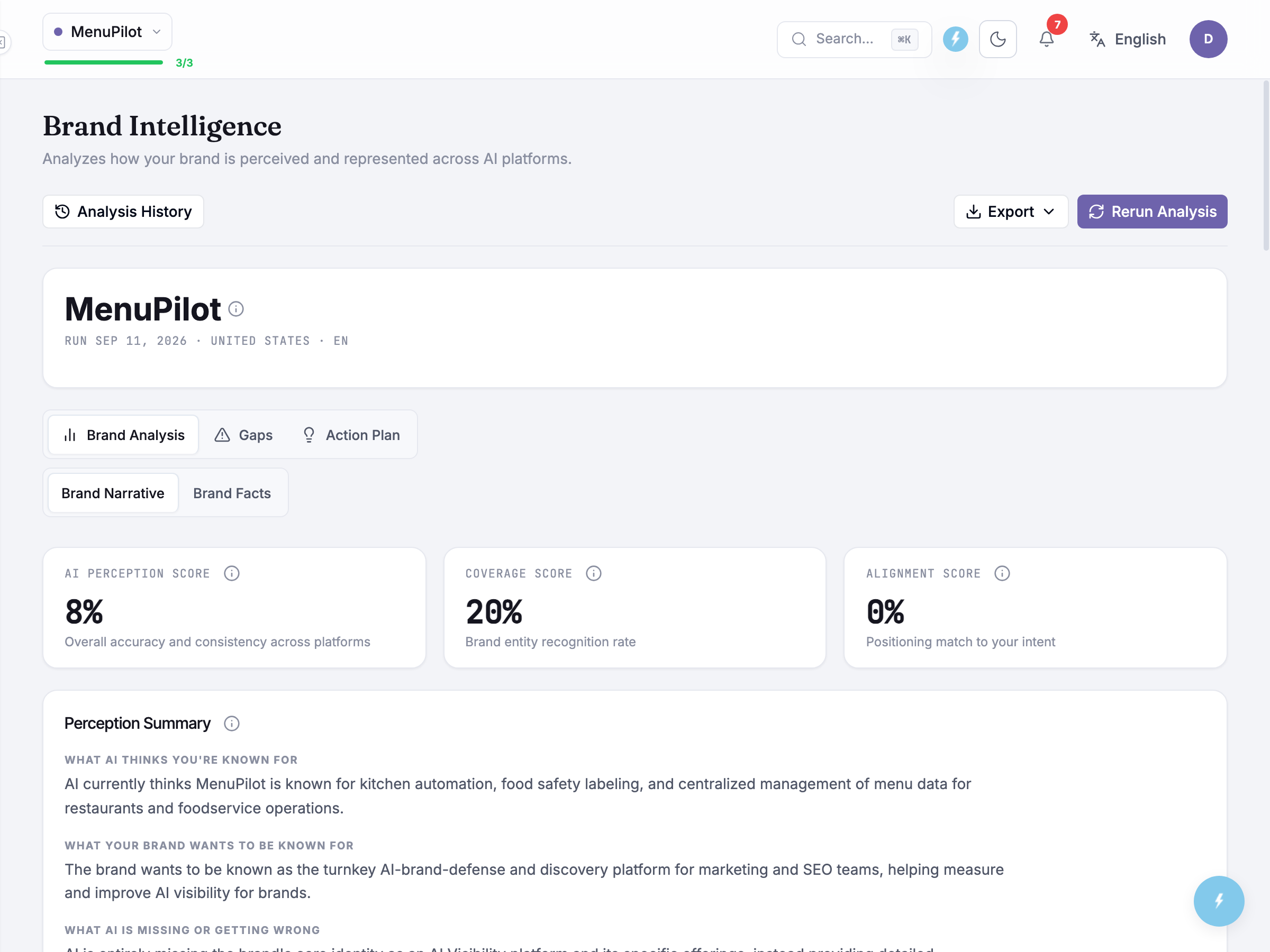
The report opens on Brand Analysis, with Gaps and Action Plan alongside it and a Brand Narrative / Brand Facts toggle underneath — the narrative side is the story AI tells about you, the facts side the checkable claims behind it.
Three scores sit across the top, all percentages. AI Perception Score is the headline — overall accuracy and consistency across platforms — and it is a composite of the other two rather than a measurement of its own. Coverage Score is the brand entity recognition rate: how often AI platforms identify your brand as the right thing at all. Alignment Score is the positioning match to your intent: how closely AI’s framing matches the positioning you defined. Read them together rather than one at a time — a low coverage score caps the headline no matter how good your messaging is, because AI cannot frame a brand it has not recognised.
Under the scores, Perception Summary puts three statements side by side: what AI thinks you’re known for, what your brand wants to be known for, and what AI is missing or getting wrong. It is the fastest read on the screen, and usually the one worth pasting into a positioning conversation. The panels below it break the same picture down platform by platform.
Reading the results
Section titled “Reading the results”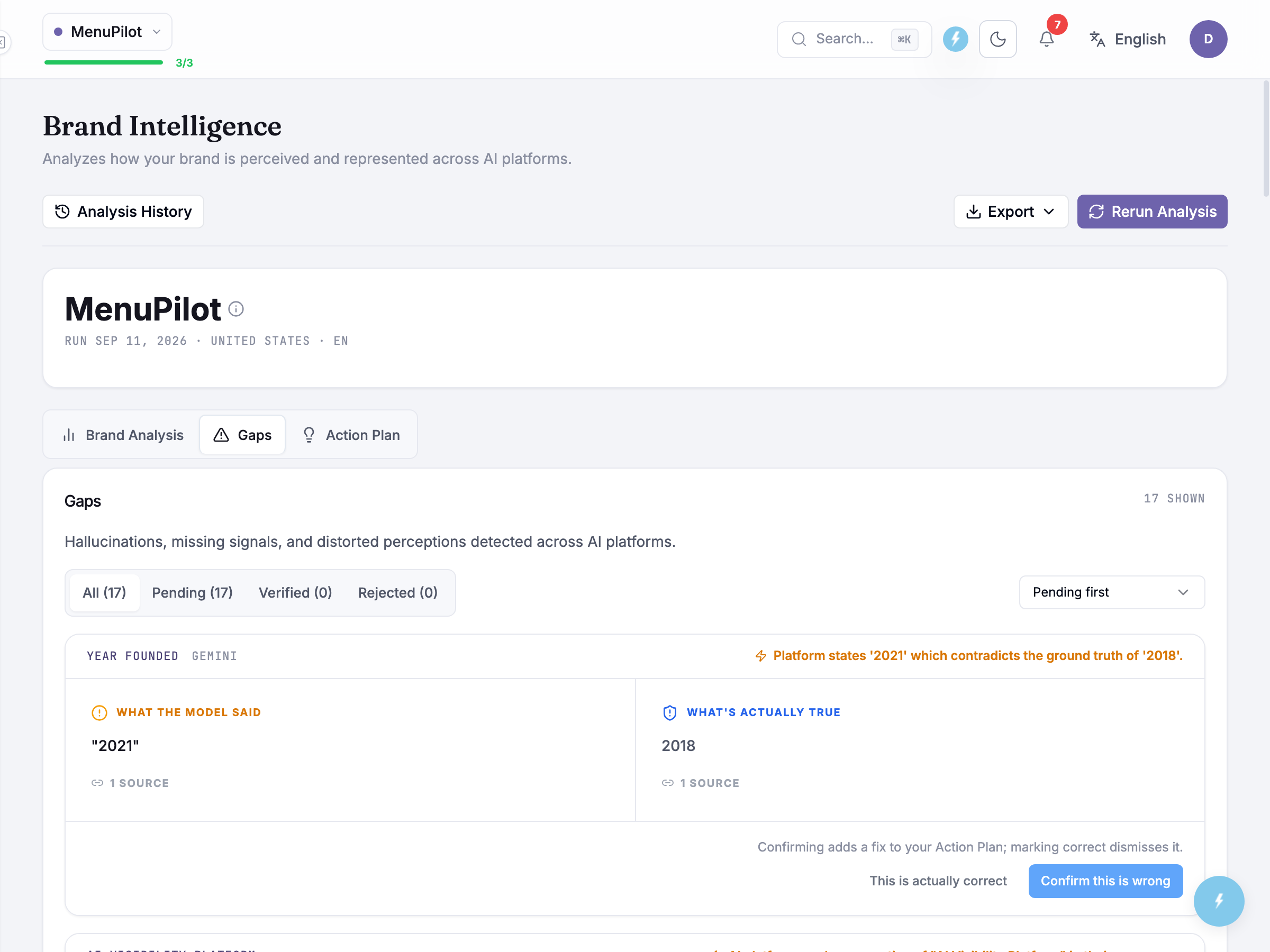
The three scores are the summary; the Gaps tab is where the work is. Each flagged claim shows: the claim as AI states it, which engines said it, a severity level, and — the part that makes this actionable — the fact-check itself, with a confidence label and, where one exists, the sourced truth. “MenuPilot was founded in 2019” sits next to Founded 2021 · menupilot.io/about, high confidence, sourced. You’re never asked to take the product’s word for it.
When the correction isn’t solid — a low-confidence check, or a “truth” with no citable source behind it — Zicy doesn’t state a flat verdict. It puts the discrepancy to you as a question: “AI says founded 1924 — our data suggests 1983. Which is correct?” You’re the one who knows, so the screen asks rather than asserts.
Every gap card offers two responses, and the wording is deliberate:
- Confirm this is wrong — you’re confirming the claim is false. Confirmed gaps feed the action plan.
- This is actually correct — AI was right and your records were the problem; the flag clears.
Confirming adds a fix to your Action Plan; marking a claim correct dismisses it. Add to fix list is not on the gap cards; it appears only on Action Plan items, covered below.
Unverifiable claims — “used by over 2,000 restaurants,” a stat with no public source behind it — are labelled low confidence and wait for your confirmation rather than being auto-judged. Nobody but you knows whether that number is true.
Confirm before you act — the ten minutes that keep the plan honest. The action plan is generated only from gaps you’ve confirmed. Nothing factual is proposed as a to-do until a human has confirmed it: unconfirmed items stay parked in the Gaps tab. Triage every row: confirm the genuinely wrong, clear the actually-correct, and give the unverifiables a real answer. A fix list built on unreviewed flags is just noise with a to-do format.
Unverifiable doesn’t mean false. It means no public source exists to check the claim against — which is itself a finding. If a claim about you is true and important, the fix is often to publish the source (a stat on your site, a page that states the fact) so both AI and this audit have something to check against.
The action plan
Section titled “The action plan”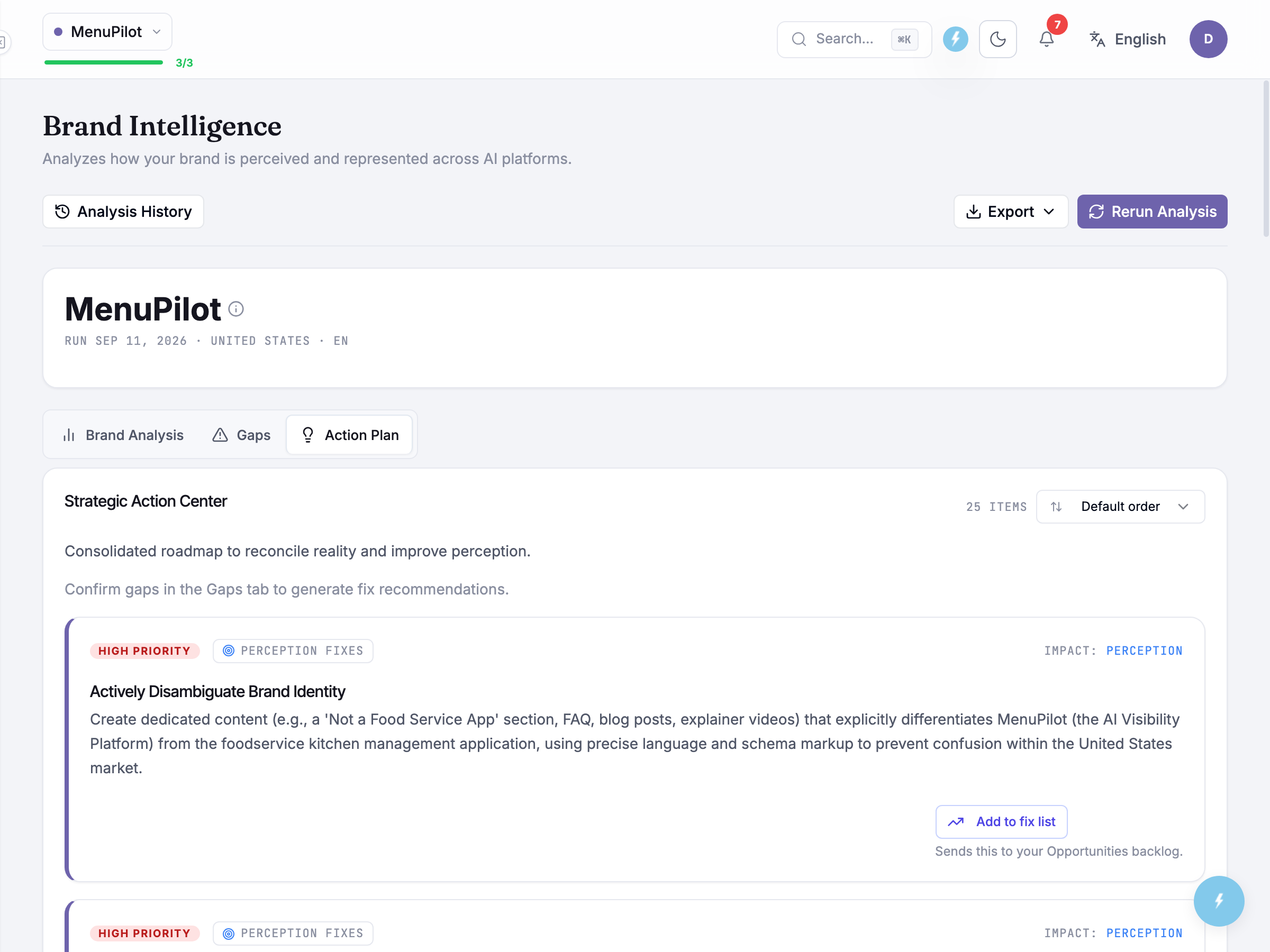
The Action Plan tab holds one panel, Strategic Action Center, which the screen describes as a consolidated roadmap to reconcile reality and improve perception. Under it the recommendations run as a single ordered list — no priority sections, no verification panel — with the item count and a Default order control in the panel header. That control re-sorts the whole list by priority, by category, or by what you have already escalated, and a direction toggle appears beside it as soon as you leave the default. The default is the order the analysis itself produced, so it is the one to read first.
Every item carries the same furniture: a priority badge (High Priority, Medium Priority or Low Priority), the category the analysis filed it under, an Impact: label saying whether the fix moves Reality, Perception or Both, and then the recommendation’s title and its instruction in full. Where the analysis has them, a root problem and an expected outcome are shown with it.
Add to fix list is the only action on the screen, and the caption under it says what it does: it sends that item to your Opportunities backlog. Once sent, the item is marked as added and the button is gone — a done marker, not a delete, so the plan stays a full record of what the run recommended.
When the plan contains no factual fixes, a line above the list says so and points you back to the Gaps tab to confirm gaps first. That is the coupling worth noticing: the factual half of the plan only comes into existence once you have confirmed gaps, so an untriaged Gaps tab leaves you a plan made entirely of perception work.
Execution lives one module over: the Take Action tools generate the schema (Schema Generator), the corrected pages (Content Optimizer), and the llms.txt (LLMs Generator) that state your verified facts where machines read them.
Fixes take time to reach AI answers. Correcting your site changes the sources; the answers follow as AI systems re-crawl and update — the lag varies by engine and can run weeks. Re-run the analysis after shipping fixes to track the three scores, and judge the trend across runs rather than expecting next-day corrections.
Common questions
Section titled “Common questions”How often should I re-run it? After any batch of shipped fixes, and on a regular cadence otherwise — monthly is a sensible default for most brands. Each run takes about 2–3 minutes and uses one run from your Brand Intelligence runs quota, so check how many runs are left this period before you plan a cadence.
What’s the difference between the coverage and alignment scores? Coverage asks whether AI recognises your brand as the right entity at all; alignment asks how closely its framing matches the positioning you defined. The headline AI Perception Score is a composite of the two, so watch coverage first — alignment cannot climb far while AI is still unsure what you are.
A claim is flagged wrong but it’s actually true — what do I do? Click “This is actually correct.” The flag clears, and your accuracy picture improves without any site changes. This is also worth doing promptly — it keeps the action plan from carrying work you don’t need.
AI says something wrong about us that isn’t in the list — why? Claims are extracted from your tracked responses. If a wrong claim circulates on a question you don’t track, add that prompt (Setting Up Prompt Tracking) and re-run — the audit can only check what your prompt set surfaces.
Do the engines matter individually? Yes — each gap shows which engines make the claim, and that’s targeting information. A wrong fact confined to one engine usually traces to a source that engine favors; the fix priority and the correction route can differ accordingly.
What to read next
Section titled “What to read next”- Take Action — where confirmed gaps become shipped schema (Schema Generator), pages (Content Optimizer), and llms.txt (LLMs Generator).
- Visibility Gaps — the broader backlog this module’s fact fixes slot into.
- AI Visibility Dashboard: its Brand Sentiment panel is the tone layer: after AI’s facts are right, this is what it feels like AI says about you.