Competitive AI Performance
What this is for, in one sentence: the head-to-head table — you and every tracked rival, side by side, on the same six measures, so a number like “41.7% coverage” finally has context.
When to come here:
- Whenever you’re tempted to ask “is my number good?”: this screen is the answer
- Before any pitch, board meeting, or client review, to say exactly where you stand against the rivals you care about
- After changing your competitor list, to see the table recalculate
We continue with Sarah at MenuPilot and her four tracked competitors.
Key numbers and terms
Section titled “Key numbers and terms”- Mention Coverage. Share of AI responses that named each brand. The cell is shaded green at 50% or more, amber from 25%, red below 25%.
- Share of Voice. Each brand’s share of all brand mentions. It has no colour shading, and the column adds up to less than 100% because untracked brands also get mentions.
- Citations. How often answers linked to each brand’s site, graded like the Web Citation Rate: green at 30% or more, amber from 15%, red below 15%.
- Average Ranking. Average position in answers. Lower is better: #3 or better is green, up to #6 amber, worse is red.
- Average Sentiment. A score out of 100 shown with its band word (Very positive, Positive, Neutral, Negative, Very negative). Positive starts at 61.
- Top Descriptors. The words AI most often attaches to each brand.
- YOU, Unranked, Tracked. YOU marks your row; Unranked means your own brand gets no rank number; Tracked marks a competitor you added to your saved list. A brand with no badge is one AI named in answers to your prompts that is not in your list.
Reading the table
Section titled “Reading the table”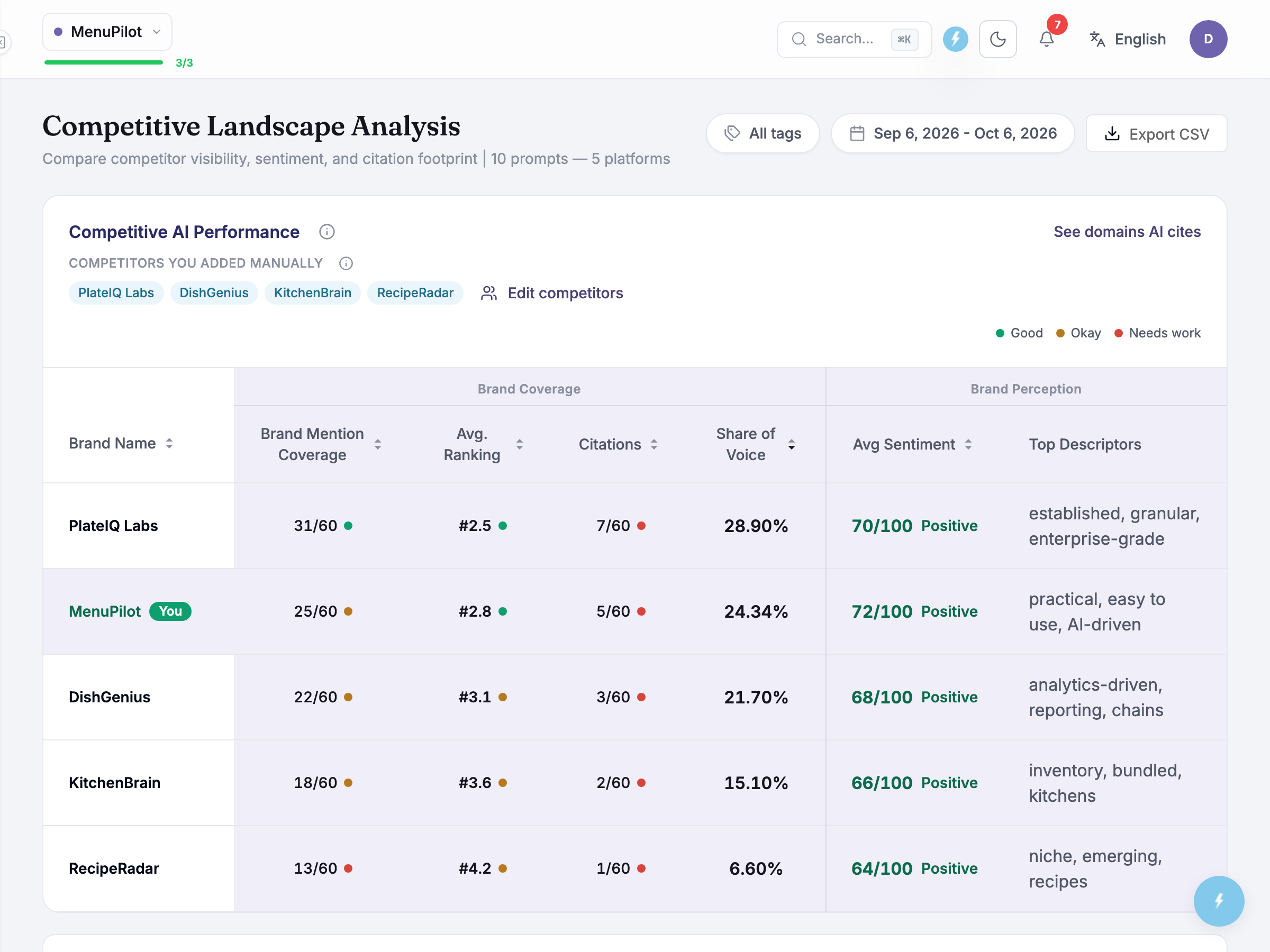
Every tracked brand gets a row with the same measures you know from the dashboard — Mention Coverage, Share of Voice, Citations, Average Ranking, Average Sentiment — plus Top Descriptors (the actual words AI uses about each brand). Your own row carries the YOU highlight so you can always find yourself at a glance, alongside an Unranked badge — Zicy doesn’t hand your own brand a competitive rank number (you’re the reference point, not a ranked rival).
A band above the table tells you who’s in the comparison. Rows for competitors you added yourself carry a Tracked badge, and any you added that AI has not named in this period are listed in a line starting Not mentioned by AI yet. Edit competitors (or Add competitors when the list is empty) sits in the same band for owners and members.
Each column header carries a short definition of what it measures, and a single benchmark legend explains the colour shading once for the whole screen: green means strong, amber means middling, red means weak — and they mean the same thing in every column. That’s what makes the strategic read fast:
- Scan your row for red — those are your weak measures.
- Scan each column for green — that’s who to study on each measure.
- Find the near-ties — Sarah trails PlateIQ Labs on coverage (41.7% vs 51.7%) but leads on sentiment (72 vs 70). Close races are where effort pays fastest.
Two consistency details worth knowing. The rank badges and the Average Ranking figure read against the same benchmark tiers, so a badge and the number beside it always tell the same story. And the Average Sentiment column uses the very same 0–100 scale as the Brand Sentiment panel on the dashboard (M-04) — a 72 here means exactly what a 72 means there.
One reading habit that prevents wrong conclusions: a rival can lead on one measure and trail on another — PlateIQ is mentioned more often, but when MenuPilot appears, AI speaks slightly more warmly of it. There’s no single “winner” column; the story is the pattern.
Why your Share of Voice percentages don’t sum to 100
Section titled “Why your Share of Voice percentages don’t sum to 100”Add up the SoV column and you’ll get less than 100%. Not a bug: AI answers also mention brands you aren’t tracking — small players, adjacent tools, one-off names. Their mentions sit in the denominator. Those brands appear as rows without a Tracked badge, so you can see them working their way in without them quietly distorting your tracked numbers. If one earns a place, add it with Edit competitors.
Top Descriptors — the narrative column
Section titled “Top Descriptors — the narrative column”The most underrated column. Each brand’s cell shows the handful of words AI most attaches to it across all answers — the compressed version of every framing you’d find reading answers one by one. (Want the full per-rival breakdown with exact counts, including negative associations? That lives in Competitor Sentiment Profiles (M-08).)
Read your own descriptors and ask: is this the story we’re trying to tell? Sarah’s “practical, easy to use, AI-driven” matches her positioning — good. Read your rivals’ descriptors and ask: what story is AI telling for them that we could contest? PlateIQ owns “established” and “enterprise-grade” — which cedes “easiest for independents” to whoever claims it.
Who exactly are you being compared against?
Section titled “Who exactly are you being compared against?”Your competitor set is a saved list you own. It is the list of competitors you added on your brand profile. Add a rival your sales team argues about, remove one that’s really from a neighbouring category, and the whole table recalculates against the set you decided on. Edit competitors above the table opens a Competitors panel on the right, where each competitor has a Brand name, an Also known as name and a Website. Use Add competitor, Remove competitor and Save; the list is saved to your brand profile. Viewers can see the Tracked badge but cannot change the list.
Because every number on this screen — and Share of Voice everywhere — depends on who’s in the set, it’s worth a quick sense-check before you quote the table:
- Are these the rivals you actually lose deals to? If a brand belongs in the comparison, add it. If one keeps surfacing in your answers but has no Tracked badge, it isn’t in your saved list yet: add it with Edit competitors.
- Anything that looks like a duplicate? You shouldn’t see one: Zicy de-duplicates competitor entities, so a single company can’t appear as two rows and split its numbers into two smaller ones. The CSV export runs the same de-duplication, so what you hand a client matches what’s on screen.
- Anyone irrelevant? A brand from a neighbouring category inflates the denominator — remove it from the set rather than mentally discounting it.
Plan and credits
Section titled “Plan and credits”- Who can open it. The Competitor entry is open to viewers.
- Plan tier. It is not marked enterprise-only, so no enterprise-tier plan is needed.
- What spends allowance. Nothing on this screen spends analyses or credits. Rivals are measured from the same answers your prompts already produce, so only prompts cost quota (see Prompt Manager).
- Export. The table has a CSV export that applies the same de-duplication as the screen.
Common questions
Section titled “Common questions”A competitor’s numbers look strangely low — are they really that invisible? Check two things first: how recently they started appearing (a newly-surfaced rival has thin data that reads as weakness), and whether they were only just added to your set. Then believe the number — you won’t see the same rival split across duplicate rows, because Zicy de-duplicates entities automatically.
Can I choose who I’m compared against? Yes. The competitor set is a saved, editable list — add or remove rivals with Edit competitors above the table, and the table recalculates against your choices. The final say is yours. Shaping your prompts (M-02) still influences which new brands surface as candidates.
My own row says “Unranked” but also shows an Average Ranking — which is right? Both — they measure different things. Unranked just means Zicy doesn’t hand your own brand a competitive rank number in this table (you’re the reference point, not a ranked rival). Average Ranking (e.g. #2.8) is a separate metric: your typical position inside AI answers. Quote the Average Ranking — “typically the 2nd–3rd brand AI names” — and read the table by comparing your columns against each rival’s.
Do competitors cost extra quota? No — they’re measured from the same AI answers your prompts already generate. Prompts cost quota; competitor tracking doesn’t.
What to do next
Section titled “What to do next”- See the words behind each rival’s sentiment score: Competitor Sentiment Profiles (M-08).
- Find the topics where each rival beats you: Key Topics Analysis (M-09).
- See whose websites AI trusts: Citation Analysis (M-10).
Related modules
Section titled “Related modules”- AI Visibility Dashboard: your own four numbers, which this table puts in context.
- Competitor Sentiment Profiles: the words behind each rival’s score.
- Key Topics Analysis: the topics where each rival beats you.
- Citation Analysis: whose sites AI trusts.