How to Find Wrong or Outdated Business Facts in AI Answers
Learn how to spot hallucinations, outdated facts, mismatched business information and other errors in AI answers, then verify what is actually true.
Key Takeaways
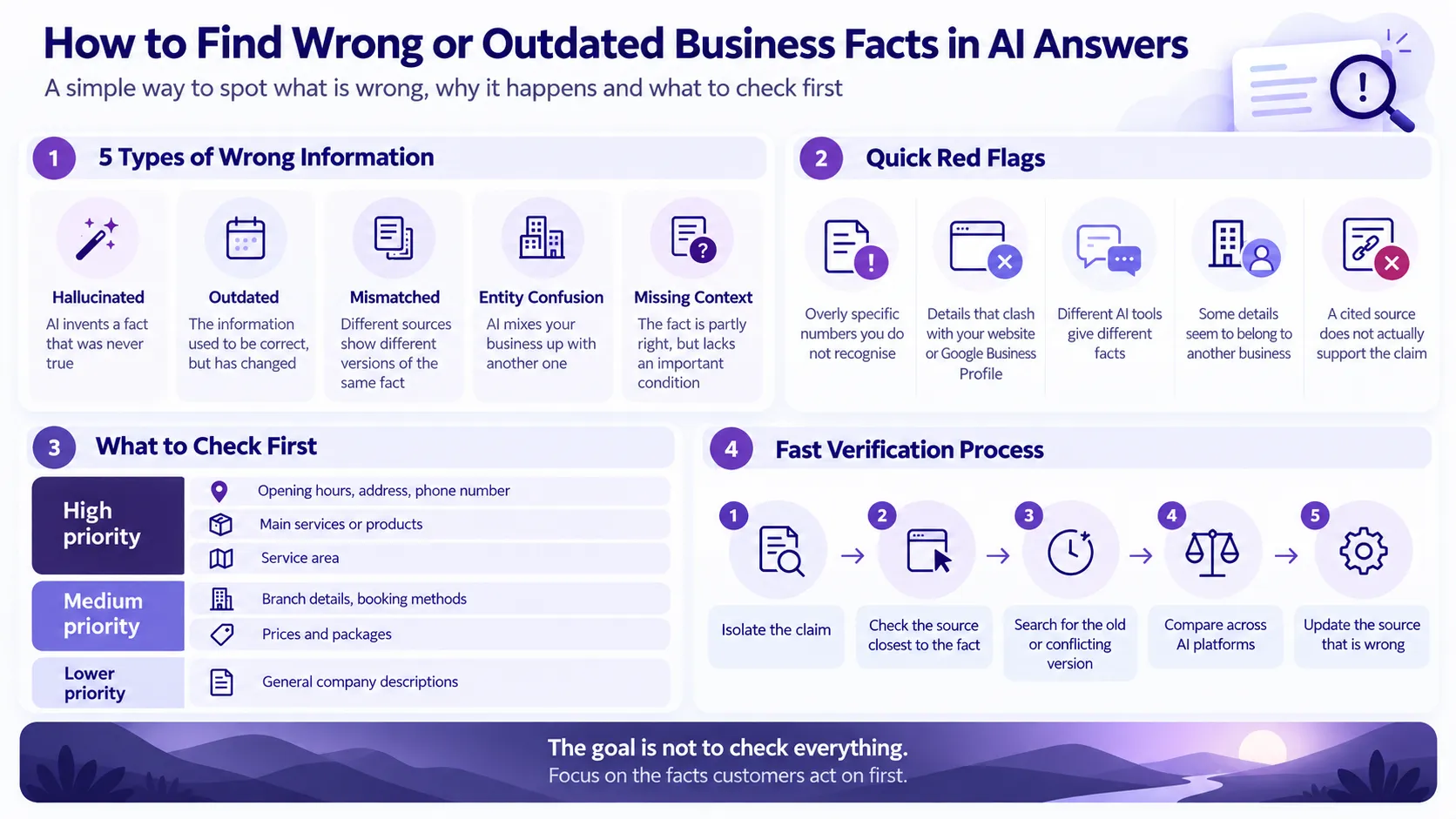
- Wrong AI information can come from hallucinations, outdated facts, conflicting sources, entity confusion or missing context.
- Red flags include overly specific claims, details that clash with your website or Google Business Profile, and citations that do not support what the AI says.
- Check one claim at a time against the source most likely to hold the current information, rather than judging the whole answer at once.
- Prioritise facts customers act on, such as opening hours, address, phone number, services and service area.
- If the same wrong fact appears across several AI platforms, check whether an older or conflicting version still exists online.
Introduction
AI can get your business mostly right and still give a customer one detail that changes what they do next.
An old opening time, wrong address, outdated service or mixed-up business description can be enough to send someone elsewhere.
The important thing is that not every wrong AI answer comes from the same problem. Some details are invented, some are outdated, and others come from conflicting or incomplete information.
This article explains how to recognise those differences, spot the main red flags and verify what is actually true without overcomplicating the process.
Why Do Wrong Business Facts in AI Answers Matter?
An AI answer can get your business mostly right and still give a customer the one detail that changes their decision.
It might say you are closed when you are open. It might show an old address, describe a service you stopped offering or send someone to a phone number you no longer use.
That matters because customers asking AI about a business are often looking for a quick answer. They may not visit your website afterwards to double-check it.
The first thing to understand is that not every incorrect AI answer is the same kind of error.
Some details are invented. Others are simply old. Sometimes the AI has found two versions of the same fact, or confused one business with another.
Knowing which problem you are looking at makes it much easier to investigate.
What Types of Wrong Business Information Can Appear in AI Answers?
Hallucinated Information
A hallucination happens when an AI model generates information that sounds plausible but is not actually true.
For a business, that could mean AI invents:
- a service you never offered;
- a branch that does not exist;
- a certification you do not hold;
- a price or statistic that was never published.
The main clue is that you cannot find a reliable source for the claim because the information may never have existed in the first place.
Outdated Information
This information was once correct, but the business has changed.
Common examples include:
- old opening hours;
- a previous address;
- a former phone number;
- a discontinued service;
- a closed branch;
- an old business description.
This can be harder to spot than a complete hallucination because the old information may still appear on older pages or listings.
Conflicting or Mismatched Information
Sometimes AI is not dealing with one clearly correct fact.
Your website might say one thing while your Google Business Profile or another listing says something different.
Google explains that Business Profile information can come from several sources, including information supplied by the business, publicly available web content, licensed third-party data and user contributions.
If those sources disagree, different versions of the same business fact can exist online at the same time.
Entity Confusion
AI can also mix one business up with another.
This is more likely when businesses have similar names, operate in the same category or are located in the same area.
The answer may look believable because some of the details are correct, just not for your business.
If the name is right but the address, services or company description seem unfamiliar, it is worth checking whether AI has combined information from two different entities.
Also read: How to Check for Brand and Entity Confusion in AI Answers
Correct Information Without Enough Context
Not every misleading answer is technically false.
A statement can be partly correct but leave out an important condition.
For example, AI might say a business offers delivery when that service is only available in selected areas.
The information is not entirely wrong, but it can still give the customer the wrong impression.
This is why it helps to check the exact wording rather than simply deciding whether an answer is broadly “right” or “wrong”.
If AI keeps describing your business too broadly or misses important parts of what you offer, it may be worth checking whether it understands your products, services and positioning correctly.
Also read: How to Check Whether AI Understands Your Products, Services and Positioning
How Can You Spot a Wrong AI Business Fact Quickly?
You do not need to fact-check every sentence in an AI answer. Start with details that look unusual, inconsistent or difficult to verify.
Watch for these common red flags:
Overly specific numbers or claims: Be cautious when AI gives an exact price, percentage, customer count, year, opening time, distance or service limit that you do not recognise. A precise answer can sound convincing even when the underlying information is wrong or outdated.
Details that conflict with your current business information: If AI shows a different address, opening hour, service or contact detail from your website or Google Business Profile, check which version is actually current. The inconsistency may exist in your own sources as well.
Different facts across AI platforms: If one AI platform gives one answer and another gives something different, the fact is worth verifying. You do not need to decide which platform is “right” until you check the information against a reliable source.
Information that seems to belong to another business: A correct business name paired with an unfamiliar location, service or description can be a sign that AI has mixed your business up with a similarly named company.
Citations that do not support the statement: If a source is provided, open it and check whether it actually says what the AI claims. A citation can help you investigate an answer, but it does not guarantee that the information was interpreted correctly.
How Can You Quickly Check Whether an AI Business Fact Is Wrong?
The fastest approach is to stop looking at the whole answer and isolate the questionable claim.
Suppose AI says:
“ABC Dental closes at 6 pm.”
You now have one fact to verify.
Start With the Source Closest to the Fact
Use the source most likely to hold the current information.
For example:
- Opening hours or address: Google Business Profile and official website
- Service offered: official service or product page
- Phone number: contact page and Business Profile
- Service area: location or service-area information
- Price: current pricing or product page
- Company history: official About page or reliable company documentation
For local businesses, Google Business Profile is particularly important, but it should not be treated as automatically correct.
Google lets businesses edit opening hours and service areas, and advises them to keep those details specific and accurate.
Then Search for the Wrong Version
Once you know the correct fact, search for the incorrect version.
An old telephone number or address can often reveal where stale information is still being published.
You are not trying to audit every website that mentions your company.
You are trying to work out whether the strange AI answer came from information that still exists somewhere online, or whether there appears to be no source for it at all.
That distinction can help separate an outdated-data problem from a possible hallucination.
Which Business Facts Should You Check First?
Not every incorrect detail carries the same business risk.
For a small or local business, prioritise information that can immediately affect whether someone visits, calls or buys.
| Priority | Business facts | Why they matter |
|---|---|---|
| High | Opening hours, address, phone number | Can directly stop a visit or enquiry |
| High | Main services or products | May cause customers to rule you out |
| High | Service area | Important for local and “near me” questions |
| Medium | Branch details, booking methods | Can send customers to the wrong place or process |
| Medium | Prices and packages | Can create the wrong expectation before enquiry |
| Lower | General company descriptions | Still worth correcting, but often less urgent |
Google's Business Profile guidance similarly emphasises accurate addresses, service areas, hours and other core business details.
The useful principle is simple:
Check the facts customers are most likely to act on first.
Where Should You Look for Conflicting Business Information?
Once you know a fact is wrong, check the places where different versions of that information may still exist:
Google Business Profile: Review your address, opening hours, phone number, website, category and service area. Also check for any Google-suggested updates, as Google may change profile information when other sources indicate that existing details are outdated or incorrect.
Your website: Look beyond the homepage. Old branch pages, contact pages, service pages or location pages may still contain previous information even after the main site has been updated.
Third-party listings: Check directories, booking platforms, review sites and other local listings that may still show older business details. Public web content, licensed third-party data and user contributions can all contribute to business information shown across Google services.
The aim is not to make every mention of your business identical across the internet. It is to make sure the most important facts customers rely on are clear, current and consistent wherever they are most likely to appear.
Also read: How to Keep Your Business Facts Consistent Across the Web So AI Can Identify You Correctly
How Can You Tell If Wrong AI Information Is a One-Off or a Pattern?
Run the same factual question through more than one AI platform.
You are not looking for a majority vote on what is true. You establish that from your own business sources.
Instead, look at the pattern.
One platform is wrong:
This may be an isolated response.
Several platforms repeat the same old fact:
Look for an outdated source that may still be widely available.
Every platform gives a different answer:
Your public business information may be inconsistent or difficult to interpret.
Keep the question as similar as possible when comparing results.
If you change the wording significantly, you also change what the AI is being asked to find or explain.
How Can You Check AI Business Facts Without Reviewing Everything Manually?
Manual checking is manageable when you only have a few important questions.
It gets harder when you want to compare several customer questions across multiple AI platforms and track which facts keep changing.
A practical approach is to keep a clear record of your current business information and compare AI answers against that reference.
For businesses checking this regularly, platforms like Zicy can bring these comparisons together by showing possible mismatches between AI answers and the business information provided.
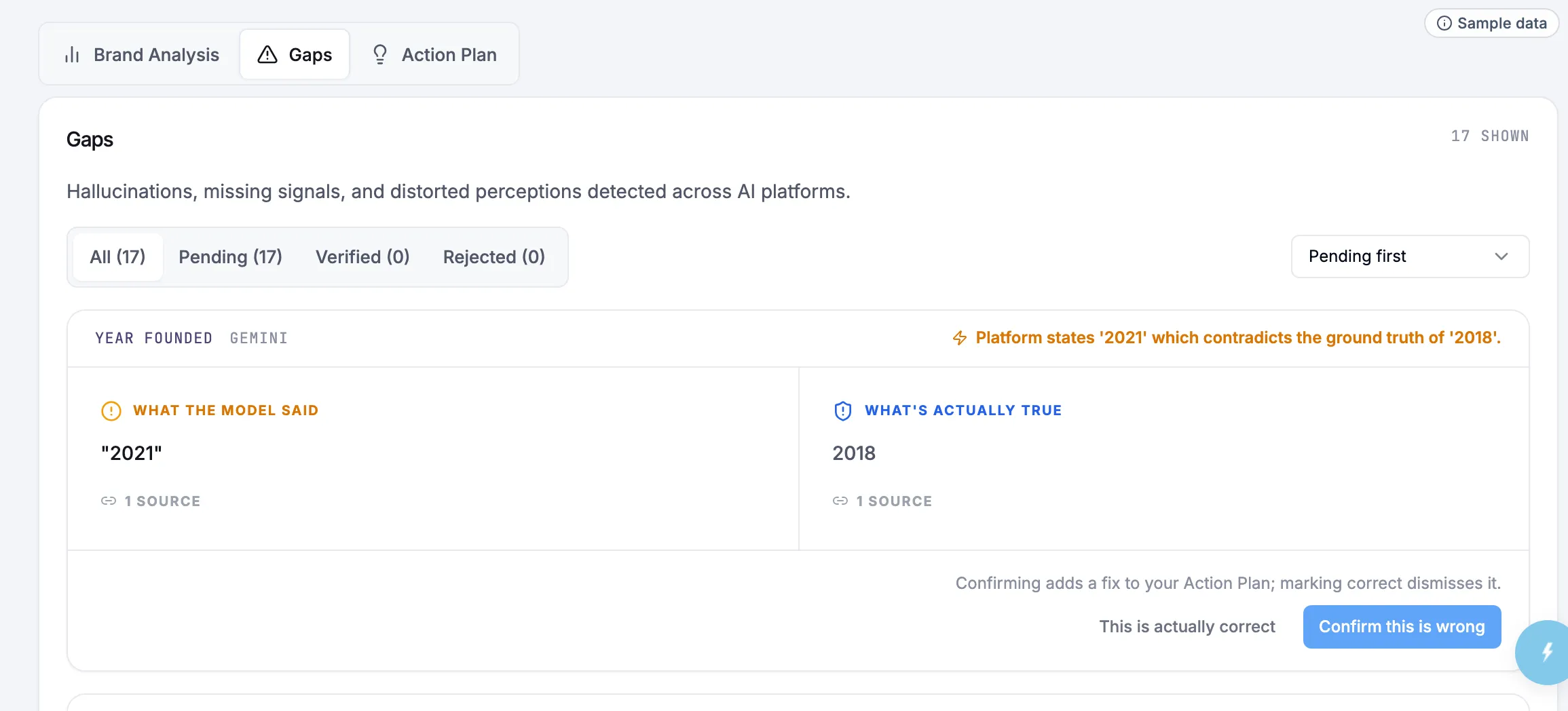
This keeps the focus on the same principle whether you use a tool or check manually: surface the questionable fact first, then verify what is actually true.
What Should You Do Once You Confirm an AI Fact Is Wrong?
What happens next depends on the type of error.
If the outdated information still appears on your website, Google Business Profile or an important third-party listing, update that source.
If several of your own pages disagree, make the current version consistent.
If the claim appears to be completely invented and you cannot find any supporting source, there may be nothing specific to remove from your website. In that case, make sure the correct information is clearly published and keep monitoring whether the false claim appears again.
For local businesses, focus first on the information customers use to make immediate decisions.
You do not need to chase every unusual sentence AI produces.
The goal is to remove genuine confusion around the facts that matter.
How Can You Reduce Wrong Business Information in AI Answers Over Time?
There is no way to guarantee that every AI answer about your business will always be correct.
AI models can still generate false information, even as they become more capable.
What a business can do is make its own information easier to verify.
Keep the important facts current. Remove obvious contradictions. Check major listings after something changes. And periodically ask AI the same questions customers are likely to ask.
Most importantly, do not treat every strange AI answer as the same problem.
A hallucination, an old address, a mismatched listing and a confused business identity each point to something different.
Once you know what kind of error you are looking at, finding the real issue becomes much easier.
Conclusion
Wrong AI information is easier to deal with once you know what kind of error you are looking at.
A hallucination, an outdated fact, a mismatched listing and entity confusion each point to a different problem. Instead of checking everything, focus on the facts customers are most likely to act on, verify them against reliable sources and correct any conflicting information you control.
The goal is not to make every AI answer perfect. It is to make your business information clear enough that wrong or outdated details are easier to spot and less likely to mislead customers.
Find the business facts
AI may be getting wrong.
Compare AI answers with your current business information, identify possible mismatches and investigate the sources behind the facts customers may act on.
