Cloudflare bot management: check and manage AI bot access for brand discoverability

Cloudflare bot management can decide whether AI answer engines ever see your site. Its AI-bot blocking and Pay Per Crawl can protect content while quietly removing your brand from AI answers, even when SEO looks fine. This guide shows how to check your Cloudflare, robots.txt and WAF settings and stay discoverable, with Zicy auditing your AI visibility.
The short version.
- As of 1 July 2025, Cloudflare reported blocking 416 billion AI bot requests on behalf of its customers (Cloudflare, reported by Wired, 2025), showing how aggressively it now protects sites from AI scraping by default.
- This follows Cloudflare's Content Independence Day initiative: AI crawlers are blocked unless they pay or receive permission, shifting the web toward a permission-first model.
- Cloudflare data (2025) indicated Google saw 3.2 times more pages than OpenAI, 4.6 times more than Microsoft, and 4.8 times more than Anthropic or Meta.
- Misconfigured Cloudflare bot management, robots.txt or WAF rules can quietly protect content while making your brand invisible in AI answer engines such as ChatGPT, Gemini, Perplexity, Google AI Overviews and Google AI Mode.
- Zicy can audit your Cloudflare bot protection, test AI visibility, and recommend a configuration that blocks abusive bots while keeping your site discoverable in AI search.
Why Cloudflare bot management now decides your AI visibility.
For years, the web's deal was simple: sites let crawlers like Googlebot copy their pages, and in return search engines sent traffic that could be monetised with ads, subscriptions or sales. AI answer engines changed that. A user types a query into ChatGPT, Gemini, Perplexity, Google AI Overviews or Google AI Mode, the AI synthesises an answer from many sources, and the user often never visits the sites that created the content.
Cloudflare's CEO Matthew Prince describes this as a platform shift that will change the internet's business model significantly. To protect content creators, Cloudflare has moved from passive infrastructure to an active gatekeeper for AI crawlers, blocking, charging or allowing them based on site-owner preferences. That is powerful, but if you do not understand your settings, Cloudflare bot management can accidentally erase you from the AI layer of the web even while your SEO looks fine.
The AI bot blocker and Pay Per Crawl.
Through its Content Independence Day initiative, Cloudflare began blocking AI crawlers by default unless they pay for access. The stated goals were to stop AI companies from taking the web's content without consent, to give creators leverage for licensing and payment, and to keep the internet a fair playing ground rather than the preserve of a few AI giants.
Different bots serve different functions, and blocking each one affects visibility in different places. Cloudflare's stack is designed to block or challenge AI bots such as GPTBot, ClaudeBot and other AI scrapers, including ones that try to ignore robots.txt, while continuing to allow traditional search crawlers like Googlebot and Bingbot unless you explicitly block them. Google complicates this: it combined its search and AI crawlers into one, so blocking Google's AI scraping also blocks Google Search indexing, forcing creators to choose between protecting content and staying in search. Cloudflare described Google's reach as an "incredibly privileged access" to the web. So while you can block most AI crawlers without hurting SEO, Google remains a special case.
To avoid a free-for-all scraping model, Cloudflare is piloting Pay Per Crawl: AI crawlers hitting your site receive an HTTP 402 Payment Required unless they pay or authenticate, and if they pay they get a normal 200 OK. That turns AI crawling into a market transaction, where AI companies pay to train on and summarise your content and publishers gain a path to recurring revenue instead of one-off scraping. For future-proof brands, this is not just a technical setting. It is part of business-model strategy.
Could Cloudflare be blocking AI answer engines from your brand?
Most answer engines rely on their own or partner web crawlers, licensed datasets, APIs and RAG pipelines, and signals from sites that allow AI access through robots.txt and headers. If AI crawlers are blocked at Cloudflare, your pages may never enter those AI indices directly, and competitors that allow crawling can dominate AI-generated answers in your space. Even when AI crawlers are blocked, engines may still reach your brand through Wikidata and Wikipedia entities, news API partners, third-party reviews and aggregators, licensed datasets and public APIs. But blocking retrieval bots prevents fresh content, FAQs, comparisons and proprietary insights from entering AI models.
The split matters. Googlebot and Bingbot still work unless you block them, so classic rankings may stay stable, while AI crawlers can be blocked by Cloudflare even if robots.txt is open, making you invisible in AI answers. As Matthew Prince has noted, answer engines do not drive traffic the way traditional search does, so if AI becomes the main interface and you are absent there, traffic and revenue decline even while your blue links stay green. In practice you are choosing between full blocking (maximum protection, minimum AI presence), full allowance (maximum reach, minimum control), or selective control, which is best practice: block unknown and bad bots, allow or monetise trusted AI crawlers, and tune access by path, for example allowing AI on blogs while blocking it on premium content. Cloudflare's stance, and Zicy's, is that a pluralistic AI ecosystem with proper payments beats either total openness or total lock-down.
How to check if Cloudflare is blocking AI bots.
- Confirm Cloudflare is active. Check your nameservers at your registrar's DNS settings; if they include names ending in ns.cloudflare.com, Cloudflare is active. A quick method is to enter your domain at dnschecker.org and select NS. You can also inspect response headers for cf-ray, cf-cache-status or server: cloudflare, or, in the Cloudflare dashboard under Websites then DNS, look for records marked Proxied (the orange cloud).
- Review Bot Management and AI bot settings. In your Cloudflare account, select the domain, go to Security then Settings, and under Bot Management find Block AI Bots. To allow crawlers, set it to Do not block, and disable Bot Fight Mode as well.
- Inspect robots.txt and AI-specific rules. Visit yourdomain.com/robots.txt and check for AI user-agents such as GPTBot, ClaudeBot, CCBot and Google-Extended, and for allow or disallow directives that may conflict with Cloudflare. If you use Cloudflare-managed robots.txt, check its AI section and any content signals around AI training, search and answers.
- Test AI visibility and bot access with Zicy. Run a Cloudflare DNS and bot test to see what is exposed, check whether your key URLs appear in AI answers for important queries, and flag discrepancies where traditional SEO is fine but AI citations are missing.
- Manually test AI engines. In ChatGPT, Gemini, Perplexity, Google AI Overviews and Google AI Mode, try queries like "best tools for your topic", "what is your brand", and "your problem plus your category". If you rarely appear, or never as a cited source, Cloudflare's AI blocking may be part of the problem.
Misconfigurations that break AI visibility.
- Blocking all user-agents containing "bot" or "crawler".
- Enabling aggressive Bot Fight Mode instead of Bot Management.
- Overly strict WAF rules challenging Google-Extended or PerplexityBot.
- robots.txt allowing AI bots while Cloudflare blocks them, a direct contradiction.
- Using Cloudflare-managed robots.txt that overrides custom directives.
- Misconfigured bypass rules for AI crawlers.
Configuring Cloudflare for protection and AI visibility.
Block AI bots aggressively if you run paywalled or strongly gated content, publish sensitive or proprietary data, or depend on exclusivity rather than broad reach. In that case, treat AI crawlers like hostile scrapers and stop them at the edge with bot blocking, WAF rules and rate limiting. Consider allowing or monetising AI bots if you want your brand present in AI answers and recommendations, you are prepared to negotiate licensing or Pay Per Crawl deals when available, and AEO and AI discovery are strategic priorities. The action then is to allow trusted AI user-agents in your bot rules while continuing to block stealthy, unidentified crawlers.
Think of the controls in layers, and make sure every layer sends a consistent signal:
- robots.txt communicates your wishes to honest crawlers.
- Meta tags and headers refine what can be indexed or reused.
- Cloudflare Bot Management and WAF enforce blocking, challenges or payments.
- Origin and server rules add any further access control.
If you intend to allow or charge AI crawlers, do not silently block them at Cloudflare; if you intend to block, reflect that in both robots.txt and Cloudflare rules.
A recommended AI bot allowlist
If your goal is AI visibility, a typical allowlist looks like this:
- Always allow (for SEO): Googlebot, Bingbot.
- Consider allowing (for AI discoverability): GPTBot (OpenAI), ClaudeBot (Anthropic), Google-Extended, PerplexityBot, CCBot, YouBot, Applebot, Amazonbot (case by case), Meta-ExternalAgent, Twitterbot, DuckDuckBot, Allen Institute crawler.
- Caution, evaluate: ByteSpider (ByteDance), AhrefsBot, SemrushBot.
- Keep blocked: unknown bots, impersonators, and AI scrapers with no documentation or terms of service.
How Zicy audits your Cloudflare and AI search readiness.
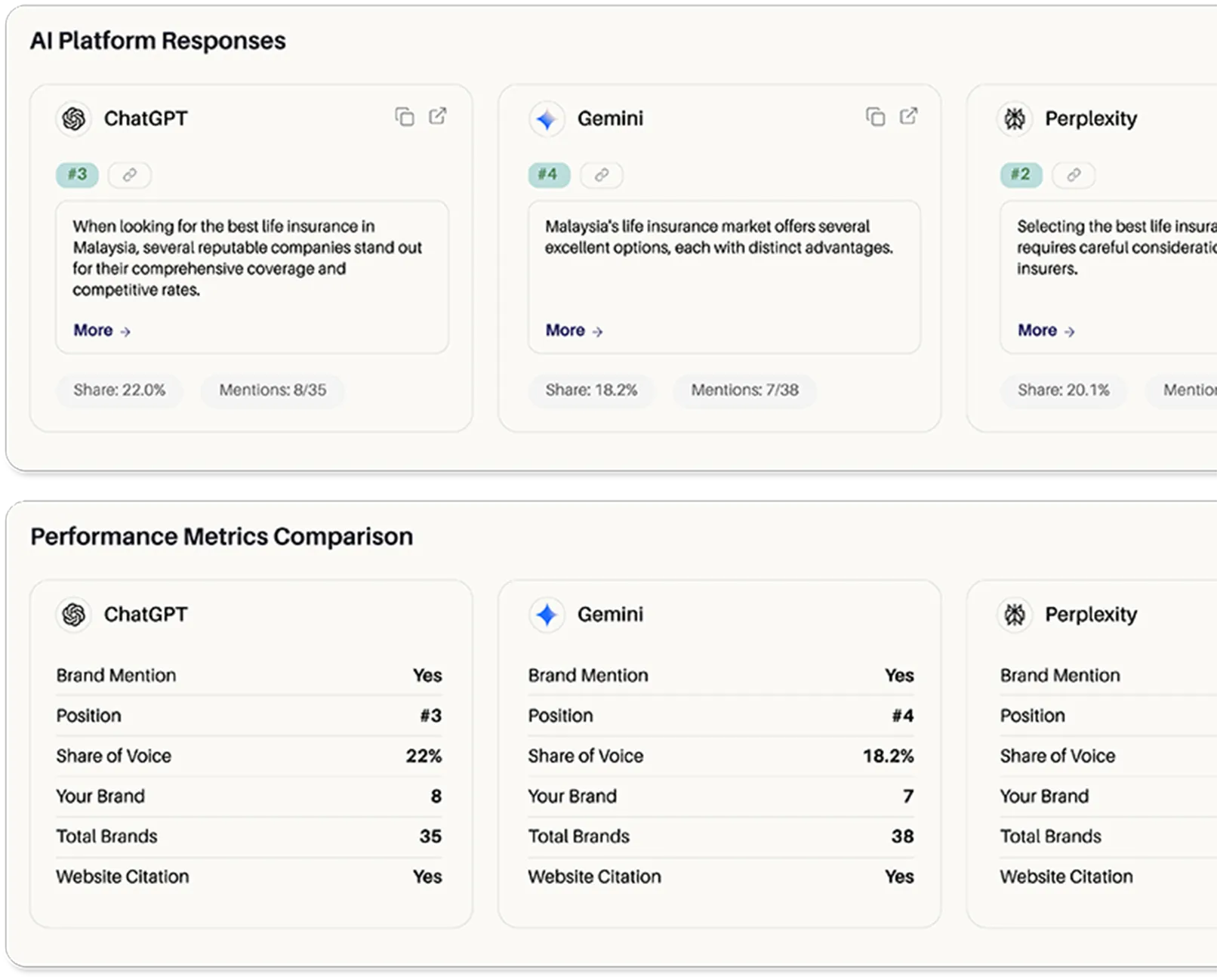
Zicy is built for the AI-driven web. It can inspect your Cloudflare bot settings, robots.txt and WAF rules, analyse your presence across the major AI answer engines, and recommend a bot strategy that aligns with your growth goals, whether that is to block, allow or monetise. It can track AI citations and shifts in answer-engine visibility, detect sudden drops that may correlate with Cloudflare or robots.txt changes, and suggest schema, FAQs and content improvements specifically for AEO.
Before you change anything, an action checklist:
- Confirm your site is on Cloudflare (DNS, CDN or Pages).
- Review Security, then Bots and WAF rules, for AI-related settings.
- Inspect robots.txt for AI user-agent rules and align it with Cloudflare.
- Decide: block all AI crawlers, allow all, or selective allow plus Pay Per Crawl when available.
- Run a Zicy AI visibility audit and refine settings based on the results.
What to do next if you use Cloudflare.

Cloudflare's AI bot controls are no longer a niche feature. They are part of the core power structure of the AI-driven web. From billions of AI bot requests blocked to a push for paid access and fair licensing, Cloudflare is trying to prevent a future where answer engines take the web's content while creators get nothing. But if you do not know how your bot settings are configured, you might protect your content and accidentally disappear from AI answers, product suggestions and knowledge graphs. Audit your Cloudflare bot management and robots.txt, decide your stance on AI scraping, licensing and visibility, and use Zicy to design a configuration that blocks abusive bots, supports sustainable monetisation, and keeps your brand discoverable and cited in AI answers, which is where citation coverage is won or lost.
Cloudflare bot management and AI crawlers.
Is Cloudflare blocking AI crawlers by default now?
Yes. As part of its Content Independence Day effort, Cloudflare now blocks many AI crawlers by default for customers, unless you explicitly allow or monetise them.
Will blocking AI bots hurt my AEO strategy and AI citations?
Yes. Blocking training or retrieval bots prevents AI systems from learning, quoting or referencing your content. Your SEO rankings can remain intact while your presence inside AI answers, and therefore your zero-click visibility, shrinks.
Does Cloudflare block search engine bots like Googlebot or Bingbot?
No. The AI bot controls mainly target AI scrapers and answer-engine bots, not standard search bots. SEO usually remains intact unless you misconfigure robots.txt or add custom blocking rules.
How do Cloudflare bot rules interact with my SEO, schema and AI Overviews?
Cloudflare sits in front of your site, so a bot blocked there sees nothing, including your schema. As long as Googlebot is not blocked, normal SEO and rich results work. Any AI crawler you block cannot use your content or schema as a source. Blocking Google-Extended in robots.txt limits AI use of your content, but hard-blocking Google’s combined crawler at the edge risks losing Search and AI Overviews and AI Mode together, so keep Googlebot allowed at Cloudflare.
How do I fix the "Sorry, you have been blocked" message on Cloudflare?
This usually comes from WAF or Bot Management. Review the event in logs, identify which rule fired, then relax that rule’s sensitivity, move it from Block to Challenge, or allow specific IP ranges or user-agents you trust.
How can site owners safely opt in to allow specific AI crawlers?
Add robots.txt entries that allow particular AI user-agents, and create Cloudflare rules that bypass AI blocks for those agents, so both layers send the same signal.
How will Pay Per Crawl change revenue for publishers and creators?
Pay Per Crawl turns AI crawling into a paid access model where AI firms pay per request or per content tier. For publishers, that can create a new revenue stream and a basis for more formal licensing deals with AI platforms.
What legal rights do sites have against unauthorised AI scraping?
Many creators rely on copyright protecting original content, terms of service that forbid automated scraping, and emerging case law recognising the value of human-created data. Legal frameworks are evolving and protections differ across jurisdictions. Cloudflare’s tools give technical leverage alongside these arguments.
How can I detect if an AI answer engine is scraping or citing my website?
Monitor logs for unusual bot activity, rotating IPs or suspicious user-agents, use Cloudflare analytics and bot reports to see AI-like traffic patterns, and use Zicy to track when and where your brand is mentioned or cited inside the major AI answer engines.
See whether Cloudflare is helping or hiding your brand.
Zicy audits your Cloudflare and AI-crawler access and tests your visibility across ChatGPT, Gemini, Perplexity, Google AI Overviews and Google AI Mode.
